
A master site is a site inside a tenant which is selected in “Shared Site” field in the Tenant item.
When do we need master site?
We need master site when we want to reuse styling, partial design, datasource, page design and rendering variants of master site within the local sites. One can also create a master site that is not publically available but contains shared items for other sites.
How to configure a site as master site?
Step 1 – Login to sitecore content editor and go to the tenant where the change is to be made.
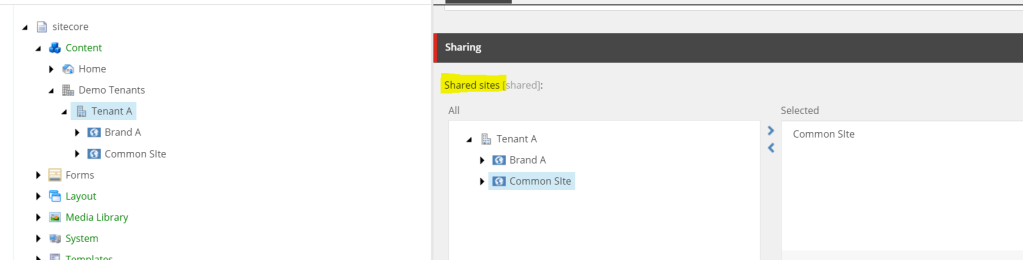
Step 2 – Go to the Shared section in the tenant item and in the Shared SIte field, select the site that you want to configure as the master site. Here, I am selecting “Common Site” as the master site. We can select more than one site as a shared site.
How to use items from master site in local sites?
In all the local sites, the options to choose rendering variants, page design, partial design, data source, etc will be there after making above change.
Example – I have added a rendering variant in the Page Content component in Master Site. Now, in experience editor, when I add Page Content component in the local site, “Common Site Variant” appears automatically as an option.

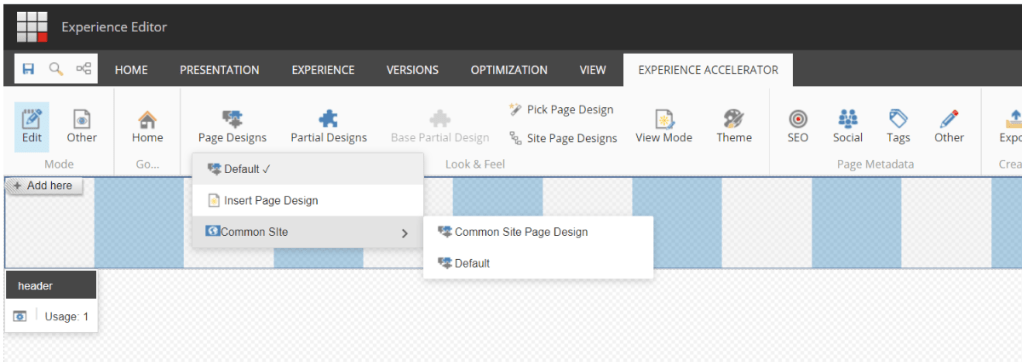
Similarly we can choose for page design, partial design and datasource as well.
Partial design –

Page design –
Datasource –

 Sitecore Notes